Need guidance on accessing ruckus access point IP address to check and upgrade firmware.
Hi @Vind24
Greetings!!!
Thank you for reaching out to the RUCKUS Lennar Home Community.
We appreciate your patience and understanding as we work to resolve the issues you are experiencing with your RUCKUS setup.
Based on the information provided, it appears that you need assistance in upgrading your RUCKUS devices to a recommended version.
We apologize for any inconvenience this has caused and are committed to assisting you promptly.
To identify the current IP address assigned to your RUCKUS devices by your local router. You can use an IP scanner tool to easily locate the IP address on your network. Here is a guide on how to perform this using the IP Scanner free application:
/kb/articles/10-how-to-find-the-ip-address-of-the-ruckus-devices-switch-and-aps-using-ip-scanner-free-applications
Could you please let me know if you are trying to upgrade the RUCKUS Switch or Access Points?
However, please refer to the below RUCKUS Lennar Knowledge Base self-help articles on Upgrading RUCKUS Switch and Access Points.
Switch:
/kb/articles/1-how-to-upgrade-ruckus-icx-7150-c12p-from-non-unified-forwarding-image-ufi-to-a-stable-ufi-version
Access Points:
/kb/articles/9-ruckus-unleashed-access-points-upgrade-process-to-the-recommended-firmware-version
I hope this helps.
Additionally, could you please let me know your Switch’s current version?
Please help me with the requested queries and let me know if you have any other queries in this regard.
Thank you again for your patience and understanding.
Best regards,
Imran Sanadi
RUCKUS Lennar Home Community.
Hi,
Current version on the switch SPS08090j. I tried to login to the IP address for the Switch and it asked me for login credentials. I put in the same credentials to login to the access points and it did not work. Not sure how to get credentials for switch access. Can we move this conversation to a private forum.
The access points are up to date with version 200.15.6.212.20. Need assistance on login to the switch.
Greetings!!!Thank you for the response and the update.
The Switch version you mentioned (SPS08090j) is also the latest UFI version and should function as expected.
Please try accessing the Switch through a web browser using the default login credentials provided below:
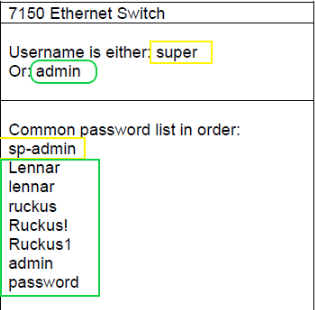
Username: superPassword: sp-admin
If these credentials do not work, you may also try the following alternative default combinations mentioned in the screenshot:
Please let me know how it goes.
Thank you again for your patience.
I trust this message finds you well.
I kindly request an update on the status of the issue so that we may proceed further with resolving it.
Thank you.
Best regards,Imran SanadiRUCKUS Lennar Home Community
I will give it a try this evening when I return. Suggest to keep it open. Since this is a public forum. Is there a way to change the username and password after I login to the switch?
Thank you for the response.
We can change/reset the Switch username/password.
Please let me know if you can log in once you try.
Hi @Imran, None of the passwords for the switch worked.
Greetings!
Thank you for your response and the update.
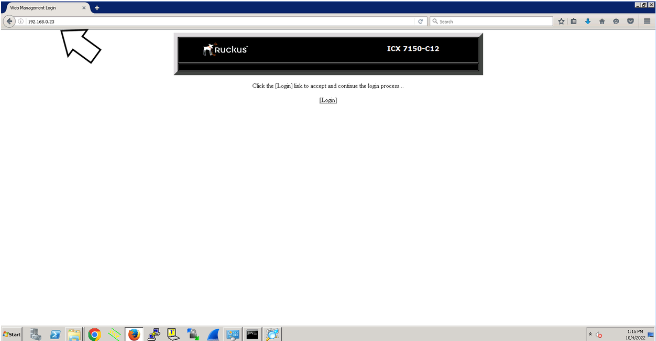
Could you please confirm if you are able to access the Switch Dashboard via a web browser? You should see a screen similar to the example below, which will help verify that the IP address corresponds to the Switch.
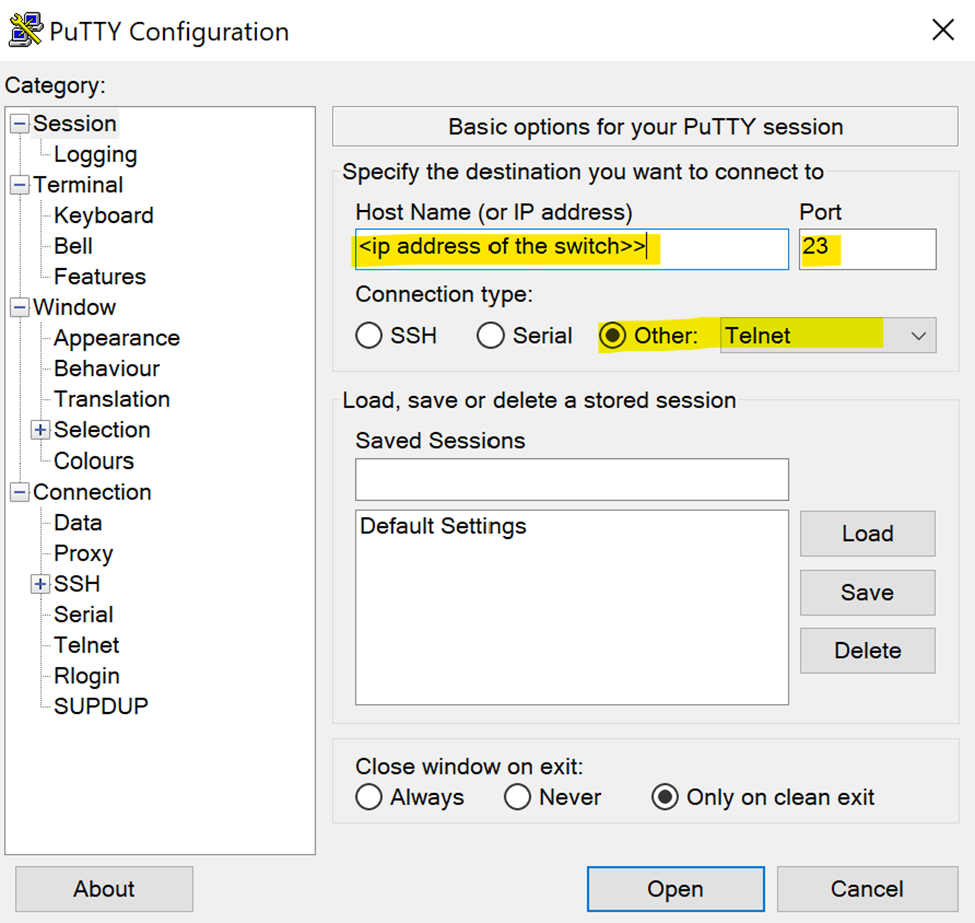
Additionally, please try accessing the Command Line Interface (CLI) using Telnet, as outlined in the following RUCKUS Lennar Knowledge Base self-help article:
/kb/articles/8-how-to-access-the-command-line-interface-cli-of-the-ruckus-icx-7150-c12p-switch
Telnet – Port 23
Kindly provide an update based on the above steps and let me know how it goes.
Thank you again for your continued patience and understanding.