Dear Ruckus Support team,
My Ruckus Unleashed system with one ICX7150 switch and five APs works well. I can configure and monitor all devices in the Unleashed web console or mobile app. I had some issues before but resolved them by reading the forum and Ruckus documentation. Thank you very much for patiently answering the questions in this forum.
I need help with the NTP configuration for the ICX7150 switch. I easily configured APs to sync their time using NTP via the web interface. However, this does not apply to the Ethernet switch, which relies on manual clock configuration. I noticed the switch's clock needs manual adjustments after several weeks when it runs standalone and/or every time there is a power failure, which happens every several months in North California.
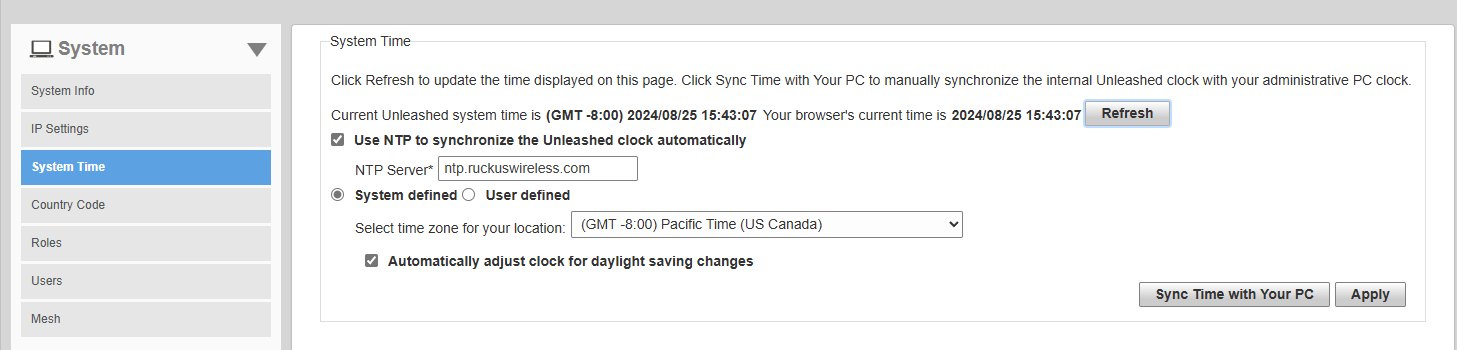
I configured NTP for APs this way and it seems to work correctly.
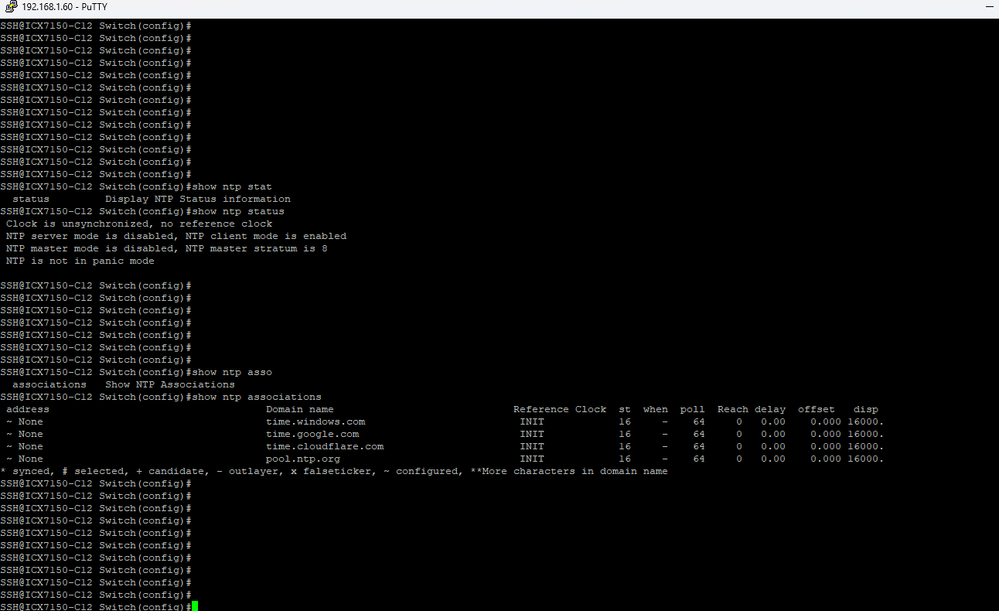
For the switch, I used 'ntp' commands in global configure mode to enable NTP, disable the server, leaving only the client mode and added several remote time servers. This is the current state - I see NTP client mode is enabled, but the switch is not able to connect to any of time services.
I use AT&T internet service, and I believe my router does not block NTP port 123. I am able to sync my Windows laptop with MS time service (time.windows.com) without any problems.
Can you please advise how to finish NTP configuration on the switch?


