On June 26 I started a thread. After receiving the same suggestions multiple times from "Jayavidhya", I am hoping someone else will help, and will actually read my messages.
As I explained:
- we lost power, and when it was back, the switch and access points were not working properly
- the ISP router is working normally, offering normal speeds of wifi connection (in that area of the home)
- on the switch, the colors were PWR: green and SYST: amber, which I understand means it is loading in boot mode
- I unplugged it, waited 30 seconds, then plugged it back in while holding the reset button
- the lights would all flash for hours, then would turn green, but at not point could we get connection from the access points (they show on the available networks list, but choosing it results in speeds less than .01mb/s)
- after trying those basic steps, I tried to login via CLI to do a software recovery but this wouldn't work (important note: I'm using a Macbook)
- I installed the necessary drivers (2)
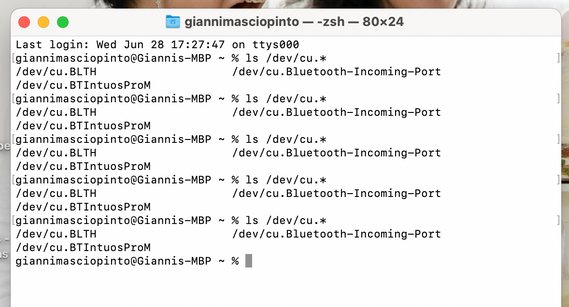
- I opened Terminal (reminder: Mac) and ran the command "ls /dev/cu.*" and noted the list of 3 results.
- I connected my Macbook to the switch via type-c USB, and ran the command again, but the same 3 results show:
- I tried to connect remotely, which also didn't work:
- I then used the suggested directions to upgrade the switch via Web GUI, which appears to have been successful but has not affected internet connectivity
As you can see, it is now running on SPS0809K.
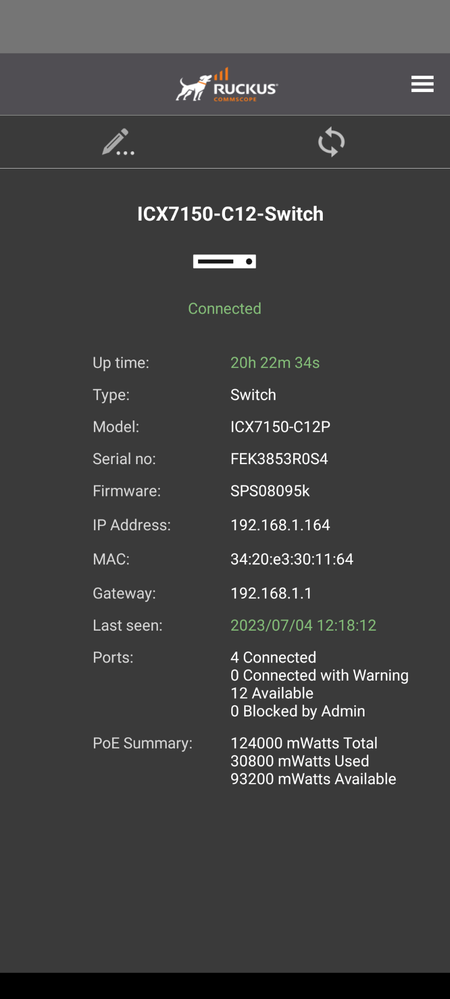
Should I reinstall using 0809H? (I installed the most recent version, but the moderator didn't respond to my question if that was an error)
After all of this, I'm still not able to connect to my access points for over a week. Please read this carefully and let me know if there is something I've done wrong or something I've misunderstood.
Thank you for any help. If you are Jayavidhya, please do not respond.





