My ISP has changed my router and modem and my wifi password is changed.After that Ruckus AP is not connected to my home wifi which needs to be resolved as the earliest.Pls support
Hello @rajaprathap ,
Greetings!
Thank you for contacting RUCKUS Lennar Home Community.
I hope you are doing well!!!
Thank you for the information you shared.
As per the case description, I understand that you have received a new modem and router from your Internet service provider and facing issues connecting to the RUCKUS network.
For guidance on setting up your system, please refer to the RUCKUS Lennar Knowledge Base self-help article linked below. The article includes detailed instructions for the setup process.
/kb/articles/12-ruckus-lennar-home-devices-connectivity-setup-and-configuration-guidelines
Please let us know if you have any queries in this regard.
Should you require further assistance or have any questions, please do not hesitate to reach out.
Thank you once again for your patience and understanding.
Best regards,
Pinky Rajendran
RUCKUS Lennar Home Community
This is a follow-up in reference to the case you have opened in the Ruckus Lennar Support Community.
I would like to know if you require further assistance since our last correspondence. Should you have any questions or if the status of your case has changed, please let me know by responding to this post.
Please feel free to contact if you have any further concerns regarding the same.
RUCKUS Lennar Home Community.
Hi,Yes I need support.My Ruckus AP is still not working and Quantum has clearly diagnosed from their end and confirmed everything is looking fine from there side.It seems to be problem with Ruckus and my AP is not powered ON and all my devices connected to Ruckus is not working.I need support from Ruckus to get this fixed as the earliest.
Also from the connectivity I verified clearly that Ethernet cable from the ISU Router is connected to one of the 12 Ports of the Ruckus switch.But still I don't see my AP is powered ON.Connectivity of the cable seems to be fine but my AP is not powering ON and devices connected via AP is still not connected.Hence I need a support on this as the earliest.
Thank you for sharing the response.
May I please know if you have unplugged and plugged in back the AP ethernet cable from the 12 ports of the Switch?
If not, please unplug and re-plug the cable and check if you are getting power to the Access point.
Also, how many access points are connected to the Switch?
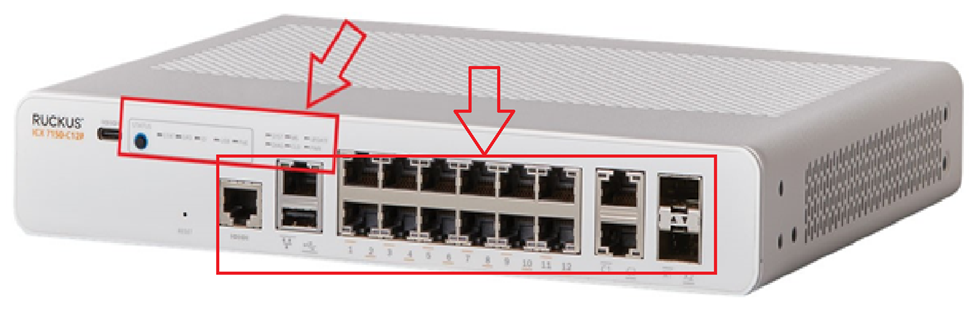
Could you please share the picture of the connection ports of the switch as shared in the below pic?
Thank you for your patience and understanding.
Regards,
Hi Pinky Rajedran,
I have 4 Cables connected to the switch out of which 2 Cables (Left to Right) are connected to my Access Points each is 1st Floor and 2nd Floor.Then the 3rd Cable to connected to the ISP router & 4th cable (Blue) is connected to the Patch panel board of my home.I have already tried resetting 2 cables that goes to the Access Point and still there is no power to the AP's.I'm not able to attach the photo here, pls let me know options to attach the photo's.I will email the same too.Look like the Ruckus Switch has problem and not working.
Emailed you the same with photo
test
Thank you for the response.
I understand that you are unable to share the pictures.
I would request you to please login to the RUCKUS account for uploading the images.
On your switch while it's plugged into the outlet, do you see any lights on? (Amber or green) Please let us know which lights are on. (Please refer to the below picture and share a picture of the same, showing the light status and the FULL Switch panel cable connections to the Switch ports)
Please help us with pictures of your ICX-7150-C12P Switch showing the status of the lights and cable connections to the Switch ports. Also, light the status of Access Points.
Before uploading the photos please log in to the RUCKUS account and you can upload the image.
Please let us know the answers to ALL the above queries or let us know if you have any queries in this regard.
Thank you again for your patience.
Switch pictureswitch command outputHi Pinky,
Herewith attached the photos of cables connected to switch as well as the putty outcomes of all the commands that you requested for.From the lights in the switch there is a Green light on the switch on the top.Let me know for next steps.
Regards.,Raj
Thank you for the sharing the pictures.
Unfortunately, we are unable to check the screenshot of the command outputs.
Could you please share the screenshot of those pages separate as it is not clear and unable to view the outputs?
Sent you the screenshot in seperate pages for all of the commands entered.Let me know on next steps
Upon checking the screenshots shared, we understand that there is an issue with the Ethernet cable used for ISP and for Access points.
Could you please try changing the ethernet cable or reconnect and connect the cable back to the ports and check if you are able to connect to the Internet?
Also, please share the screenshot of the connection ports of the Switch after reconnecting the Ethernet cables.
Could you please disconnect the Ethernet cable and try connecting the cables to any one of the other 12 ports on the Switch?
Also, please enter the below commands once you log in to CLI and share the output.
Note: Hit Enter to accept each command
enable
show version
show flash
show inline power
show interface brief
lldp neighbors detail
Please share the output of the above commands or share the screenshots if stuck at any step or error (if any) and let me know if you have any queries in this regard.
Thank you again. We appreciate your patience and understanding.
Hi Pinky,
I'm frusturated now and need a technician despatch with parts considering my warranty.I have done all troubleshooting whatever you are asking in the email.Give me a call in my mobile # +16126667366.I need this to be escalated and addressed. I cannot repeat the troubleshooting steps.I'm now last attaching the command output after attaching the cable to different ports as you requested.But needs this to addressed on prioirty.
Regards.,
Raj
I certainly understand how frustrating it could be.
From the responses shared, we understand that there are issues with the PoE and we should enable it.
To fix the issue and enable the PoE on the Switch, please perform the commands on the CLI:
Switch>enableSwitch#configure terminalSwitch(config)#interface ethernet 1/1/1 to 1/1/12Switch(config-mif-1/1/1-1/1/12)#inline power
Once you perform the above commands, all ports should be On, and Access points should get the power.
Once the RUCKUS ICX-7150-C12P switch ports come online, it should fix the issue.
I had the command executed to enable POE as per your recommendation, but still my Access Points don't have Power.Attaching the screenshot for your reference.Can we now get in to next steps we have done enough troubleshooting now.
Regarsds.,
Thank you for your patience on this.
We will work together and try to fix this issue as early as possible
We would need to check the PoE status after the Poe has been enabled.
As yo have enabled the PoE on the Switch, could you please enter the below commands once you log in to CLI and share the output.
Here is the udpated status as requested.
Hi @rajaprathap ,
Please use the private chat option to respond so we can proceed further. For your reference, I have included a screenshot below.
replied back already
Thank you for your response.
Unfortunately, I have not received the private message.
Could you please resend it using the private message option, as mentioned in my previous post?
Sending this screenshot again.
Could you please send the private message to me to proceed further?
I don't see option to send you a private message
Hi @rajaprathap
I’ve raised an RMA case and sent you a private message with the RMA details. Please check and let me know if you have any questions.
Thank you once again for your patience.
Best regards,Imran SanadiRUCKUS | Lennar Home Community Support