7150-C12P
I'm attempting to hard reset my system after switching to Quantum Fiber. Nothing is happening after I hard reset my icx.
Hi @doesntmatter
Thank you for the query.Could you please elaborate on "switching to Quantum Fiber" ?What is expected out of hard reset in relation to "switching to Quantum Fiber" ?Any specific configuration that would be expected at the connecting port?Thanks,Robin.
Greetings!!!
Thank you for reaching out to the RUCKUS Lennar Home Community.
We appreciate your patience and understanding as we work to resolve the issues you are experiencing with your RUCKUS setup.
Based on the information provided, it appears that you are encountering issues after switching ISP (Internet Service Provider)
We apologize for any inconvenience this has caused and are committed to assisting you promptly.
Please note that it is not necessary to perform a hard reset on the Switch or APs after connecting the ISP cable. Just access Internet from RUCKUS devices.
Kindly refer to the RUCKUS Lennar Knowledge Base self-help article below for detailed information on device connectivity and configuration guidelines:/kb/articles/12-ruckus-lennar-home-devices-connectivity-setup-and-configuration-guidelines
Please check and let me know the results.
Thank you for your patience and understanding.
Best regards,Imran SanadiRUCKUS | Lennar Home Community Support
I do not have the system password from the initial setup up in my home.
Greetings!
Thank you for your response and the update.
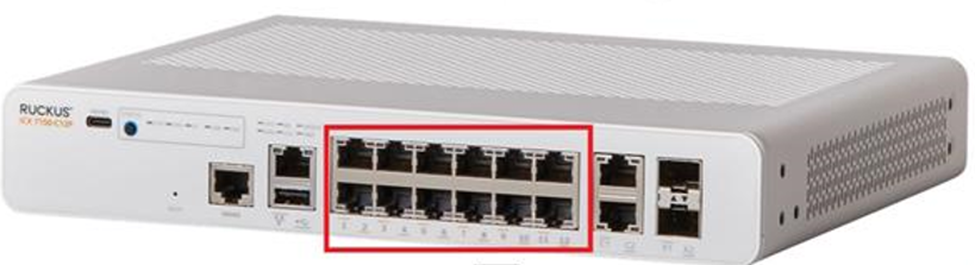
Please note that the cable from your ISP, as well as cables from any other devices such as Access Points, Doorbells, or Cameras, must be connected to any of the ports labeled 1 through 12 on the Switch. Please refer to the screenshot below for clarification.
Since you are not aware of the RUCKUS Wi-Fi Access Point’s username and password, kindly perform a factory reset on the Access Point as described in step 7 of the article I shared in my previous response.
Please check and let me know the results, or if you have any further questions regarding this.
Thank you once again for your patience and understanding.
That's it for me? No more help?
This is no help
Thank you for your response.
Could you please let me know if you have followed instructions shared in my previous post and performed a factory reset on the Access Point as described in step 7 of the article.
Please confirm.
I trust this message finds you well.
I kindly request an update on the status of the issue so that we may proceed further with resolving it.
Thank you.